451/2 · COMPUTER STUDIES · Paper 2 (Practical) · Nov. 2024 · 2½ hours
Instructions: Write your name and index number on each printout and on the CD/removable storage medium. Write the name and version of the software used for each question. Answer all the questions; all questions carry equal marks. Passwords should not be used while saving files. Transfer all files to the storage medium, print your answers and hand in all printouts and the storage medium.
Question 1
Marquee College of design intends to use a database to manage fee payments from its students. You have been tasked to create a database for the College.
(a) Open a database program and create a database file named Marquee. (1 mark)
(b) You have been provided with the following data in tables to be entered in the database. Study it and answer the questions that follow.
Course
| CourseID | CourseName | Fee |
|---|---|---|
| C01 | Professional photography | 4500 |
| C02 | Leather design | 3000 |
| C03 | Footwear design | 2500 |
| C04 | Jewellery design | 2000 |
Tutor
| TutorID | TutorName | Office | CourseID |
|---|---|---|---|
| TUT1 | Kwame | 1037 | C01 |
| TUT2 | Amina | 1043 | C02 |
| TUT3 | Chijioke | 2715 | C04 |
| TUT4 | Fatima | 4872 | C05 |
Trainee
| TraineeID | TraineeName | CourseID |
|---|---|---|
| TR1 | Baraka | C01 |
| TR2 | Aisha | C03 |
| TR3 | Lulendo | C02 |
| TR4 | Zahara | C04 |
FeePayment
| TraineeID | CourseID | AmountPaid |
|---|---|---|
| TR4 | C04 | 300 |
| TR3 | C02 | 400 |
| TR4 | C04 | 500 |
| TR2 | C03 | 900 |
| TR2 | C03 | 1200 |
| TR3 | C02 | 1600 |
| TR1 | C01 | 1700 |
| TR1 | C01 | 1700 |
(i) Create the tables with the appropriate fields and datatypes. Set a primary key field for each table where applicable. (10 marks)
(ii) Create appropriate relationships among the tables. (4 marks)
(iii) Create a form named TraineesForm that would be used to enter data into the trainee's table. Add the following in the form: form heading — font size 15 and boldface; command buttons — for addition and deletion of records. (4 marks)
(iv) Enter the data into the respective tables. (10 marks)
(c) Create a query that would:
(i) list all trainees and the name of the course they are enrolled in. Save the query as TraineesQuery; (2 marks)
(ii) display the course name and fees for the course whose ID is C02. Save the query as C02; (3 marks)
(iii) compute the total amount paid by each trainee. Save the query as TraineeTotalQuery. (6 marks)
(d) (i) Create a report that summarises the fee payments made by each trainee. Include TraineeID, TraineeName and Total amount paid by each trainee. Order the report records by the total amount paid from the highest to the lowest. Save the report as FeePayment. (5 marks)
(ii) Format the report created as follows: Title: TRAINEES PAYMENTS; Footer text: Prepared by 'Your index number'. (2 marks)
(e) Print out each of the following: 4 tables; 3 queries; trainee report. (3 marks)
Note: tutor TUT4's CourseID C05 does not exist in the Course table, so enforcing referential integrity between Tutor and Course will reject that record unless C05 is added or integrity is not enforced on that link.
Question 2
(a) (i) Open a Desktop Publishing program and make the following layout design settings: page orientation — portrait; all page margins — 2 cm. (1 mark)
(ii) Save the design as DTP. (1 mark)
(b) (i) Create a paragraph style named twin based on no-style and apply the following formats: spacing before paragraph 8 pt; spacing after paragraph 0 pt; spacing between lines 1.5; text font size 12 pt; stretch the characters to 110%. (3½ marks)
(ii) Create a style named bull based on no style and apply the following formats: hanging indent by 0.5 cm; font colour blue; bullets applied. (3 marks)
(c) (i) Create the publication as it appears below. (34½ marks)
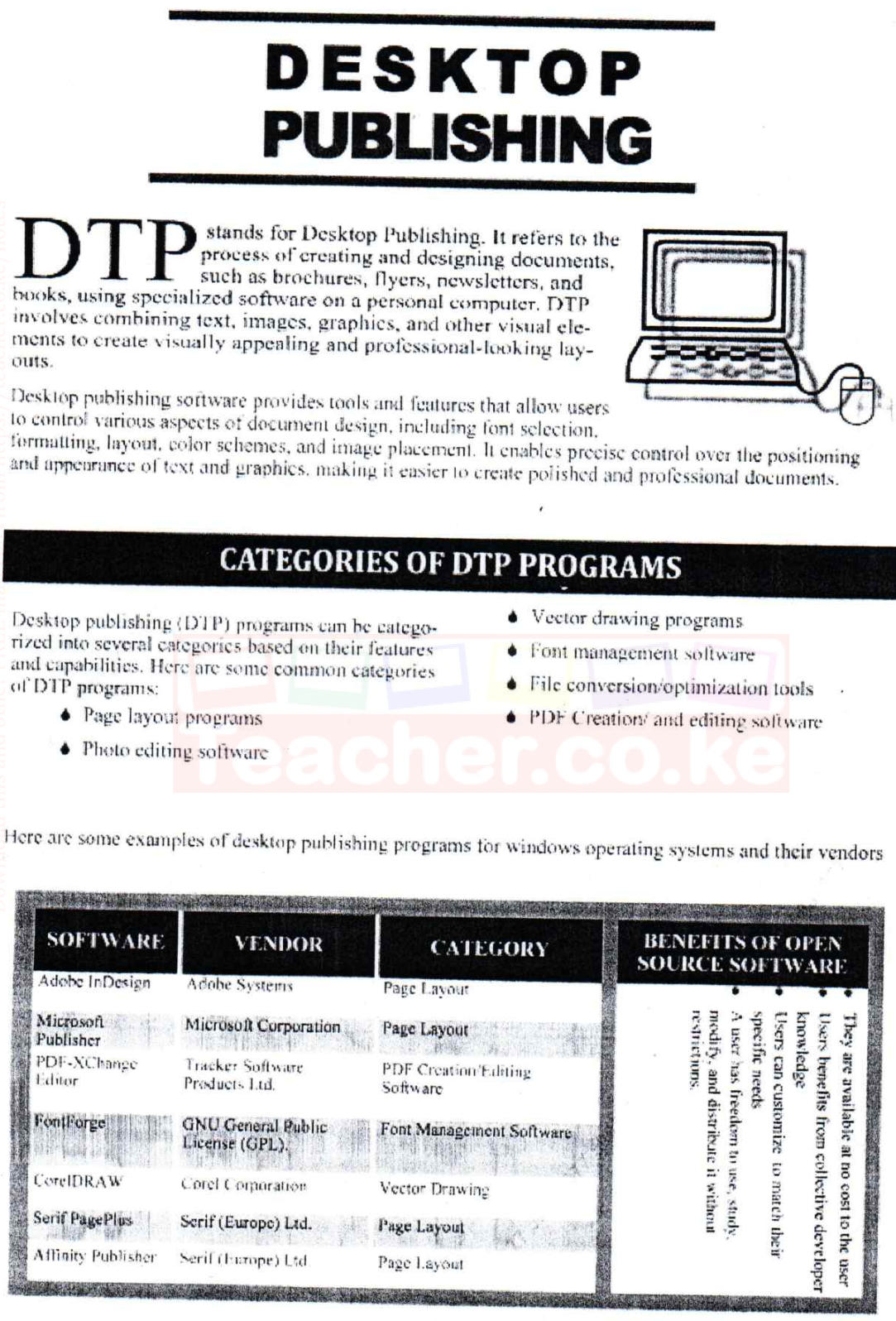
(ii) Apply the style named twin to paragraph 1, paragraph 2 and paragraph 3. (1½ marks)
(iii) Apply the style named bull to the bulleted text. (½ mark)
(d) (i) Apply a 2 pixels page border line. (1½ marks)
(ii) I. Insert your index number in the header section. (½ mark)
II. Format the header as follows: alignment — centre; font style — italics. (1 mark)
(e) Save the publication to print later. (2 marks)
No marking scheme for this paper is on file.