451/2 · COMPUTER STUDIES (Practical) · Paper 2 · Nov. 2023 · 2½ hours
Instructions: Write your name and index number at the top right-hand corner of each printout and on the CD/removable storage medium. Write the name and version of the software used for each question on the printouts. Answer all the questions; all questions carry equal marks. Passwords should not be used while saving files. Transfer all files to the storage medium, print your answers, and hand in all printouts and the storage medium.
Question 1
(a) Open a word processing program and create the following document as it appears. Save it as Fancymusic. (15 marks)
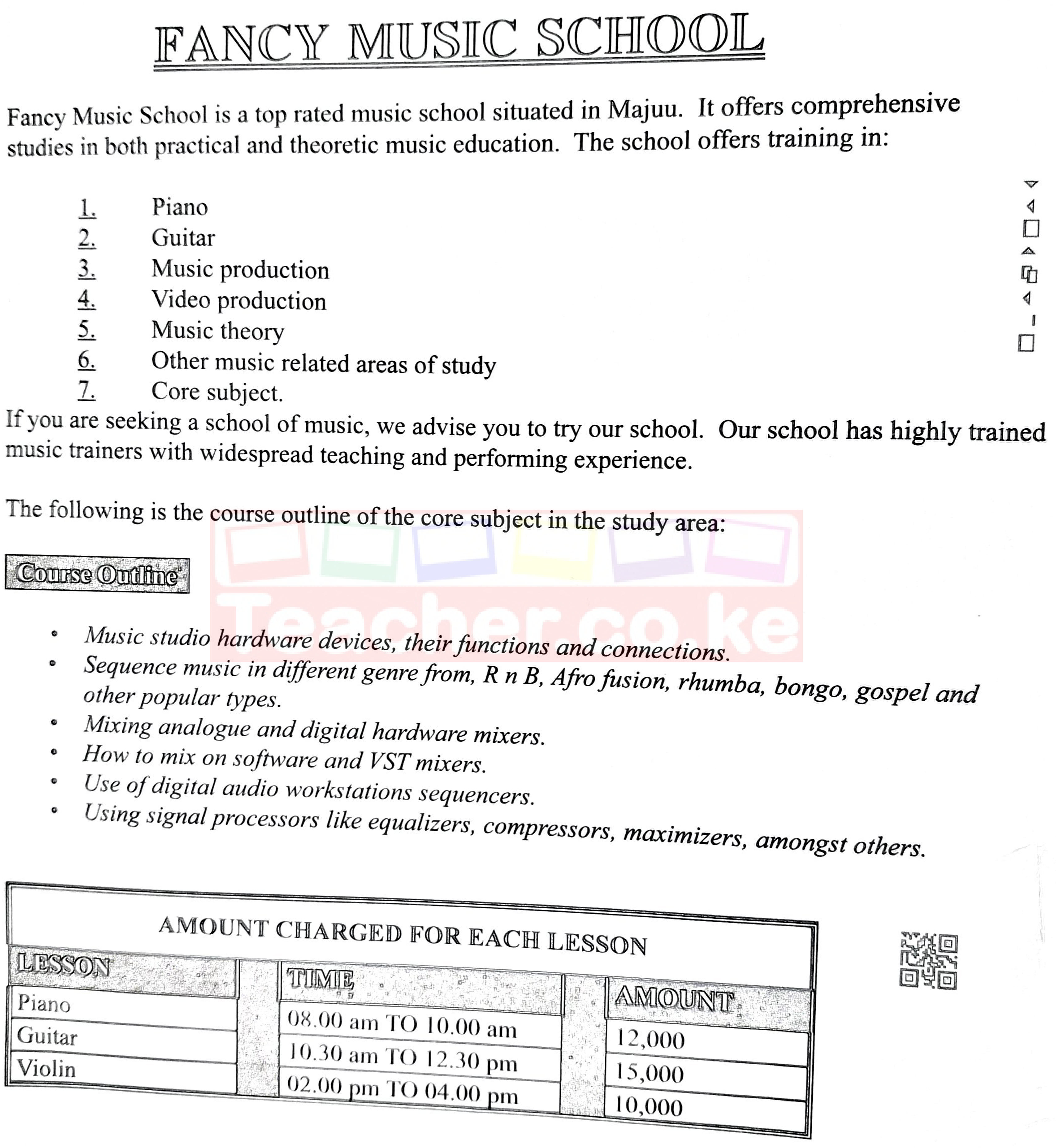
(b) Apply each of the following formats to text in the document:
(i) drop cap to the word "Fancy" in the first paragraph with a spacing of 7.6 mm; (1 mark)
(ii) align the heading "Course Outline" to the centre and set its character size to 13 pt; (1½ marks)
(iii) three columns on the bulleted text with lines between them; set the width of the first column to 70 mm. (1½ marks)
(c) Apply each of the following formats to the table:
(i) cell spacing of 0.8 mm; (1 mark)
(ii) insert a caption "music is fun" below the table; (1½ marks)
(iii) insert a row below the Violin details; type the text TOTAL in the second cell of the inserted row; (1 mark)
(iv) use a function to compute the total for the amount. (1 mark)
(d) (i) Create the following logo as it appears in Figure 1. (3½ marks)

(ii) Move the logo to appear above the title "Fancy Music School". Align it at the centre. (1½ marks)
(e) Insert page numbers of the format Page x of y at the bottom of each page of the document. (2 marks)
(f) The management of Fancy Music School intends to use the mail merge feature to create letters inviting fans to attend an extravaganza in the school.
(i) Open a blank word processing document and create a data source as it appears in Table 1. Save the document as invitee. (3½ marks)
| Title | Name | Phone_No | Fees |
|---|---|---|---|
| Mr | Joan | 0181014 | 8000 |
| Mrs | Ali | 0723566 | 7000 |
| Dr | Dorcas | 0739445 | 5000 |
| Mr | John | 0814613 | 6500 |
(ii) Open a blank word processing document and create the following invitation letter. Save the document as extravaganza. (7½ marks)
Fancy Music
P.O. Box 77711
MajuuTo «Title» «Name»
«Phone_No»Dear «Name»
RE: MUSIC EXTRAVAGANZA
It is my pleasure to invite you for a Music extravaganza in our Music School. You are requested to pay an entry fee of Ksh «Fees» to help grace the occasion. All visitors to be seated by 9.00 am.
Your presence will be highly appreciated.
Yours faithfully
John Harry
Event Coordinator
(iii) Merge the invitee data source in (i) with the extravaganza document. Save the merged document as musicinvites. (5½ marks)
(g) Print each of the following: Fancymusic; invitee; the merged letter for Dorcas. (3 marks)
Question 2
Figure 2 is a spreadsheet extract showing income and distance covered by taxis on different dates and times. Study it to answer the questions that follow.
(a) Open a spreadsheet program and key in the data in sheet 1 as it appears in Figure 2. Save the file as Taxisincome. (8 marks)
| A | B | C | D | E | F | |
|---|---|---|---|---|---|---|
| 1 | REGISTRATION NUMBER | DATE | 4.00AM–9.00AM | 9.00AM–1.00PM | 1.00PM–5.00PM | DISTANCE (KM) |
| 2 | KBBT 1002 | 15/1/2023 | 4000 | 2000 | 3000 | 45 |
| 3 | KCCT 1004 | 17/1/2023 | 3000 | 1500 | 2000 | 36 |
| 4 | KCCT 1005 | 18/1/2023 | 700 | 500 | 900 | 25 |
| 5 | KVCT 7005 | 19/1/2023 | 6000 | 800 | 900 | 38 |
| 6 | KJCT 1222 | 17/1/2023 | 1000 | 800 | 1250 | 18 |
| 7 | KTTX 2545 | 18/1/2023 | 1800 | 1900 | 3000 | 34 |
| 8 | KLTX 1345 | 19/1/2023 | 1700 | 2000 | 2000 | 33 |
| 9 | KMCT 4445 | 15/1/2023 | 900 | 4000 | 25000 | 34 |
| 10 | KUCT 140L | 19/1/2023 | 1300 | 3000 | 700 | 22 |
| 11 | KRRT 1678 | 15/1/2023 | 1000 | 2000 | 800 | 32 |
| 12 | ||||||
| 13 | ||||||
| 14 | FUEL PER KM | 25 |
Figure 2
(b) (i) Insert the following column headings in the cells indicated: Total income in G2; Fuel Expenditure in H2; Parking Fee in I2; Commission in J2; Profit in K2. (1 mark)
(ii) Format the cells containing column headings as follows: background colour black; font colour white. (1 mark)
(c) (i) Insert a row above the column headings. (½ mark)
(ii) Merge and centre the cells in the range A1:K1. (1 mark)
(iii) Enter the text "INCOME GENERATED FROM TAXIS" in the merged cell and bold the text. (1 mark)
(iv) Change the worksheet orientation to landscape. Scale the worksheet to 65%. (2 marks)
(d) (i) Copy the content of sheet 1 to sheet 2. Rename sheet 2 as income computed. (1½ marks)
(ii) Apply the thousands comma separator to the values in the range C3:E12. (1 mark)
(iii) Use the conditional format feature to apply a red fill with dark yellow text for values that are less than 1000 in the cell range C3:E11. (3 marks)
(e) Using a formula and cell addresses only, compute each of the following:
(i) total income generated by each taxi; (1½ marks)
(ii) total income generated by all the taxis from 4.00 am to 9.00 am; (1 mark)
(iii) fuel expenditure for each taxi, given that the expenditure is obtained as a product of distance (km) and the constant rate indicated in cell B15; (2½ marks)
(iv) parking fee, given that it is charged at 2% of the total income. (1½ marks)
(f) The commission paid to each taxi driver is computed using the criteria shown in Table 2.
| Total income | Commission rate (%) |
|---|---|
| Greater than 10,000 | 10 |
| Greater than or equal to 5,000 and less than or equal to 10,000 | 7 |
| Less than 5,000 | 4 |
Use the IF function to compute the commission for each taxi driver. (5½ marks)
(g) Using the COUNTIF function, compute the number of taxis that did not operate on 15/01/2023. (3 marks)
(h) (i) Insert your name and index number at the bottom centre of the footer. (1 mark)
(ii) Set the worksheet margins to 1 cm all round. (1 mark)
(iii) Insert single-line borders to all the cells with values. (½ mark)
(i) (i) Insert a clustered bar chart that compares income generated by the following taxis — KBBT 1002, KVCT 7005, KMCT 4445 — between 4.00 am–9.00 am and 1.00 pm–5.00 pm. (3½ marks)
(ii) Apply the following formats to the chart: chart title INCOME GENERATED COMPARISON; x-axis Registration Number; y-axis Income in Ksh; data table enabled; bars for 4.00 am–9.00 am filled black; bars for 1.00 pm–5.00 pm filled orange. (6 marks)
(iii) Move the chart to a new chart sheet and rename the sheet as comparison. (1 mark)
(j) Save the changes and print each of the following: income computed; comparison. (2 marks)